In today's advanced telematics systems, it is common to see different dashboard indicators that may require your attention.
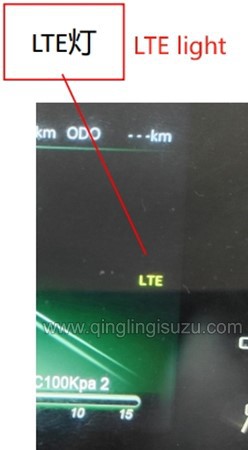
One of these indicators is the LTE light, which can be on for multiple reasons. This guide will cover the steps to troubleshoot this situation specifically on the 700P dashboard.
Before proceeding with troubleshooting, it's essential to understand what the LTE indicator signifies. In most vehicles, LTE indicates the status of the vehicle's connectivity to the internet via a cellular network.
An illuminated LTE indicator might indicate problems with the vehicle's telematics system or its connection to the cellular network.
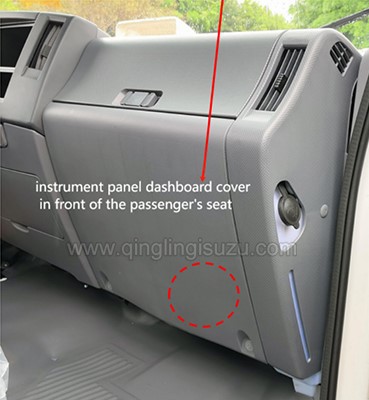
The Telematics Box, often referred to as TBOX, is the component responsible for managing the vehicle's connectivity features, including cellular data.
It is secured to the lower section of the cab's metal framework, situated behind the instrument panel dashboard cover positioned ahead of the passenger's seat.
To address the illuminated LTE indicator, you'll need to locate a white plug connected to the TBOX.
This plug is typically located near the TBOX unit and can be easily identified by its color.
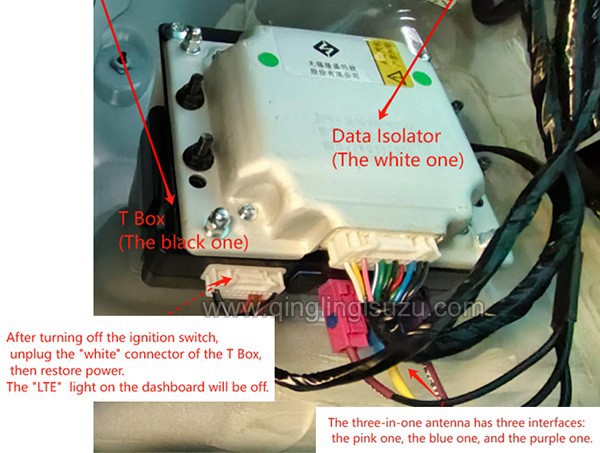
Once you've located the white plug connected to the TBOX, carefully unplug it from its socket.
After turning off the ignition switch, unplug the white connector of the TBOX, then restore power.
The LTE light will be off.
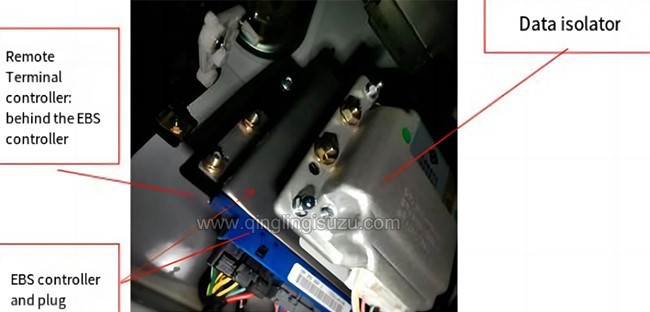
FAQ: How the T Box is set?
A: From front to back in the following order: data isolator, EBS controller, and remote terminal controller.